ToLiss,LR,Zibo OANS

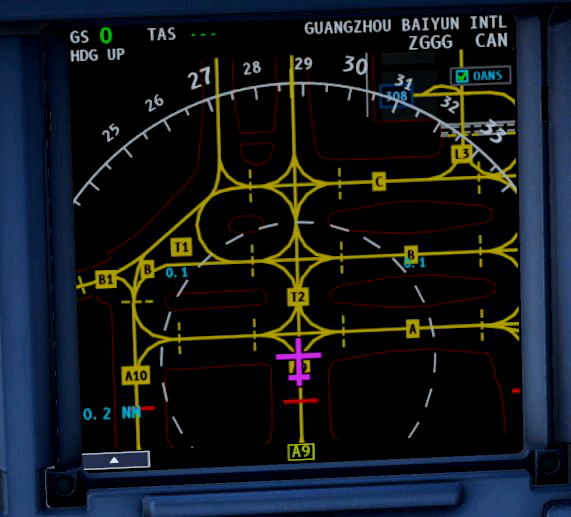
The ToLiss OANS add-on enhances the ToLiss A319, A320, A321, A339, and A346 aircraft series in X-Plane 12 by providing an operational advisory navigation system (OANS). This plugin features various functionalities, including taxiway mapping, ground traffic indicators, and runway approach advisories, specifically designed for operation within a 10NM range. While intended for fun rather than precise simulations, it includes improvements and updates to accommodate multiple aircraft configurations. Installation requires placing the "00_ToLissOANS" folder in the designated plugins directory.

3.7 / 5
264 downloads
Screenshot 1

Description

oans for toliss all series, lr330, zibo737
some code from A350,with some small fix and small improve
license under GPLv3, due to A350 get some idea from FBW A380 which is GPLv3


Read Q&A plz !!!! No reply if Question in Q&A


support function below:
~ map with taxiline or taxiroute
~ ground traffic
~ mark item
~ runway approaching advisory
~ current position [option]
oans only available when range select is 10NM


just for fun not an accurate simu of real 320 oans


for mac user, need to run
[xattr -d com.apple.quarantine "xxx/64/mac.xpl]

------------

Q: how to install
A: unpack zip. and put folder "00_ToLissOANS" into "X-Plane 12/Aircraft/ToLissA320/plugins". (prefix "00_" to ensure plugin init before FBW)

Q: if something wrong with custom acf file (eg. A319neo.acf)
A: try del "config/toliss/a319.json" and restart xp. if still not work. see Q: need help

Q: mcdu2 strange behaviour
A: plugin use mcdu2 to get active runway, takeoff&land&altern airport. can turnoff "auto get info from mcdu2"/leave text in mcdu2 to solve

Q: need help (cant show on nd or other fatal problem)
A: 
1. install debug version
2. select aircraft
3. after load scenery, turn range to 5/10NM, wait 3s, quit xp
4. run CollectLog.exe to generate a zip.
5. zip + a320.acf(maybe like this) + cockpit_inner.obj(maybe like this) send me (google link or something)


thanks:
CHOXON 2 CHOXOFF、heart4sck、KILO_333167、ricardo404

Changelog

  • v0.4.45 07. Nov 2026
    small improve
    fix bug
  • v0.4.43 04. Nov 2026
    support zibo737
    small improve
    support highlight taxiroute
  • v0.4.39 02. Nov 2026
    support lr330

Comments

Add Your Review
User avatar
azuraah 06. Nov 2026
sent google link on private messages
User avatar
Eyderoe 06. Nov 2026
1. install debug version 2. select aircraft 3. after load scenery, turn range to 5/10NM, wait 3s, quit xp 4. run CollectLog.exe to generate a zip. 5. zip + a320.acf(maybe like this) + cockpit_inner.obj(maybe like this) send me (google link or something)
User avatar
azuraah 05. Nov 2026
question and answer read how do i get this to work on the navigational display? no clue how to, even when display range is at 10. can only get it to work as a popup
User avatar
Eyderoe 05. Nov 2026
open source, you can compile plugin by yourself. and maybe share your free virus. lol github: AlexandraZaychik/ToLiss-OANS
User avatar
Avseniy 04. Nov 2026
Comes with a free virus
User avatar
foolishnpc70 04. Nov 2026
how do i use this in zibo 737
User avatar
Eyderoe 04. Nov 2026
安装debug版,开启游戏,nd-range最小,然后30s内关闭游戏。运行CollectLogs.exe,并把压缩包扔给我
User avatar
Austin__shen 03. Nov 2026
无法显示在屏幕里,只能使用窗口模式,该怎么办
User avatar
Eyderoe 03. Nov 2026
read Q&A plz. 1. normal plugin, just throw it into plugin folder. 2. turnoff "auto get info from mcdu2" or leave text in mcdu2 to solve
User avatar
rex91 02. Nov 2026
How to install and have it working with LR 330?

Download

Version: 0.4.45
Size: 7.97 MB
Uploaded: 07. Nov 2026

Author

Eyderoe

Joined Apr 2023

Contributors

No contributors listed.

Requirements

  • • X-Plane 12 or later

Information

Release Date 31. Oct 2026
Downloads 264
Rating 3.7